





- Posted by:
- Posted on:
- Category:
BeamNG.driveBeamNG.drive - System:
Unknown - Price:
USD 0
Registering with Steam
That’s it, you now got a steam account and you should be logged into it already.
Installing Steam
- Ensure that you are logged in as an administrator on the machine which you would like to install Steam on
- If you have previously installed Steam and are reinstalling to remedy a problem with your prior installation, please see the
Uninstalling Steam topic for instructions to remove any prior Steam installations
- Check the
Troubleshooting Network Connectivity topic to ensure the required ports for Steam are open on your network
- Download and run the Steam Installer from
If you encounter any issues with your installation, please try
Contacting Steam Support for assistance.
Purchasing the game
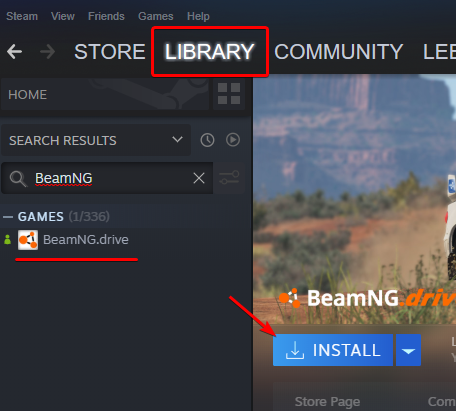
Installing the game
- If Steam isn’t running already, launch it
- Navigate to Library
- Select BeamNG.drive from the list
- Click Install
Useful articles
If you experience any issues during the first launch, please, check there articles:
Last modified:
September 18, 2024
Was this article helpful?


